The window is not where the work lives
Agent Bridge Terminal, said /ɛɡɯbɯɾɯtʰɯ/ or /ˈæɡbərt/ — a contraction rather than a word, so there is nothing here to get wrong.
An agent workbench built around one decision: a session belongs to a process that owns its log, not to the interface watching it. Everything else in the system is a consequence of that.
Close the app and the run continues. Open it on another machine and you are in the same session, mid-turn. The transcript is the truth, not a cache of it.
Three processes, and only one of them owns anything
Most agent tools put the loop inside the application. That makes closing the window a decision about the work. Here the application is a client: it renders and commands, and holds no session state at all.
Why the host owns the log
Detaching a process is not enough on its own. If the app still owned the log, a running agent's events would have nowhere to go the moment it quit — the work would continue and the transcript would not, which is worse than stopping.
Why that makes a second client free
Two devices are two connections to one owner, not two copies of a session. They see the same transcript because there is only one, and turns are ordered by arrival at the host — the only ordering that exists when neither client can see the other.
The loop runs on the machine it is changing
A remote session does not stream tool calls across the network. The host is installed on the target, so a file read is a local file read, and the link carries only the transcript. Which is also why the link is allowed to drop.
What the bootstrap actually does
Nothing is installed system-wide and nothing needs a package manager on the far side: a private Node runtime is unpacked under ~/.agbrte, the host bundle is copied in version-stamped, and the process is started detached so it survives the ssh session that started it.
Windows needed a second answer to the same question. A Windows host cannot listen on a unix socket, so it listens on loopback and proves who it is with a bearer token — and the file holding that token is given an explicit ACL, because chmod 0600 is close to a no-op there and inherits whatever the parent directory allows.
Local works. A machine that stays awake works better.
Nothing here requires a server. Attach a folder on the laptop you are typing on and everything above is true of it: the host is still a separate process, the log is still durable, closing the window is still a non-event.
What a laptop cannot give you is the half of the promise that depends on time. A detached host survives the app closing; it does not survive the lid closing. Sleep, a reboot, a battery — each of those ends the process, and a run that was going to take four hours is over at the first of them. The design's durability is bounded by the machine's uptime, and on a laptop that bound is short and arrives without warning.
So the shape this is built for is a computer that stays on — a spare desktop, a home server, a cheap VPS, an old laptop with the lid open and sleep disabled. Sessions live there and keep working; your laptop and your phone are windows onto them, and closing either costs nothing. That is also when the rest of it starts paying: a run continues while you are asleep, and the machine you pick it up on the next morning need not be the one you started it from.
Reaching it without a fixed address
Most home and office connections have no static IP, and often no way to open an inbound port at all. Three shapes work, and they differ in one thing: which side dials.
A mesh VPN — the intended answer
Tailscale, WireGuard or similar gives every machine a private address that follows it between networks. Both ends keep that address on café wifi and at home, so ssh works unchanged and the browser client can bind to it directly.
A jump host — free if you already have one
The ssh alias is handed to your own ssh untouched, so whatever ~/.ssh/config already says — ProxyJump, a proxy command, a key, a port — is what happens. If you reach the machine today, this reaches it too, with nothing new configured.
A reverse tunnel — when nothing inbound is possible
The agent computer runs ssh -R out to any host with a stable address and holds it open. You attach to that host's forwarded port. Nothing listens on the agent computer's side of the NAT, and nothing has to.
Dynamic DNS — the weakest of the four
A name that follows a changing IP still needs an inbound port, still needs the router to cooperate, and still exposes that port to the internet. It solves the address and none of the rest.
Do not put the browser client behind a public tunnel. The link carries the token that admits a client, and the address still decides who can reach it at all — which is why it binds to loopback unless told otherwise. A private network has already established who is connecting; a public URL has established nothing, and a bearer in a link is not a reason to put a shell on the internet.
A tree that cannot outspend its root
Work decomposes. The risk in letting an agent decompose it is a tree nobody can see the bottom of, spending money nobody agreed to. Both are handled by structure rather than by watching.
| Limit | Value | What it protects |
|---|---|---|
| Tree depth | 3 | A deeper tree almost always means the split was wrong, not that the work is deep |
| Children per session | 8 | Keeps one node reviewable by a person |
| Open descendants | 24 | The whole tree's concurrent sprawl |
| Budget | reserved at spawn | Taken from the parent's remainder before the child exists — checking at spend time is a report, not a limit |
The decomposition can exist before the run does
A tree is built one seam at a time: an agent proposes a split and a person approves it. That is right when nobody knew the shape in advance, and wasteful when somebody did — the same decomposition is re-derived on every run and written down nowhere. A workflow is that shape as a file.
Why a file, and not a wizard
An agent proposing a whole graph is exactly the autonomous decomposition this design otherwise refuses — a tree of subtly mis-scoped children is harder to salvage than one overlong session. The objection is not that a machine did the spawning; it is that nobody read the decomposition. So an agent proposes a workflow by writing a file and never by starting a run, and hand-written and agent-proposed documents converge on one artifact reviewed in one medium: a diff, at the reader's own pace, with history and a branch. A twelve-node graph in an approval dialog is not read.
That is also why the file has a canonical form. These live beside session templates in the repository and are tracked, so an editor that reordered keys would turn a one-word change into a wall of diff — and a review nobody can read is not a review. The rule the format holds is exact: changing one field changes one line.
The refusals arrive while you are writing
A seam wrong in a document is wrong for the same reasons a seam is wrong at spawn, so it is refused by the same function. Leaving out what a part must not touch is the one worth naming: without exclusions a child reads widely to re-derive context it was never given, which is the cost the split was meant to avoid — so it cannot be defaulted, because only the author knows what they are keeping. The editor runs those checks on every keystroke and marks the node in the picture, which turns a refusal that would have arrived mid-run into something you fix while you are already looking at it.
The budget is checked the same way and differently: a workflow is the one place a complete check is possible, because every node's ceiling is written down, so the whole graph is priced before anything runs. A refusal can then say what it costs, what is available, how short it is, and which parts to cut — where reserving as it goes would stop at the seventh node of twelve, report one number, and release what it had taken.
What a failure does
It stops what depended on it, following the arrows, and nothing else. Stopping the whole graph discards branches that had nothing to do with it and may already be finished; carrying on regardless starts a part whose input never arrived, which spends a turn to reach the same failure one step later. The document already says which parts are which — that is what the arrows are — so this needed no new field.
The run itself keeps no record of its progress. What has run is read from the children every time it is asked, because the log is the source of truth and a scheduler with its own bookkeeping is a second one that can disagree with it. A host that restarts mid-run therefore has the parts, their states and the tree; what it does not yet have is which document they came from, and that is the one piece still to make durable.
Eight kinds of target, two of them real
The transport table is a promise about where work can run. Six of these are not built — and the point of the table is that asking for one is refused by name rather than quietly running the work on the laptop instead.
| Target | Status | What is missing |
|---|---|---|
| This machine | observed | — |
| Linux, macOS or Windows over SSH | observed | — |
| WSL distribution | not built | the runner; the control channel it needed now exists |
| Docker / Podman container | not built | its control port must be published when the container starts |
| Kubernetes pod | not built | kubectl port-forward held open; a pod can be rescheduled mid-run |
| Dev container | not built | the container transport, plus reading devcontainer.json |
| Hosted agent service | not built | a locality with no transport — a different path, not a harder one |
| Custom | not built | there is no plugin API to register with |
Two things go stale: the app, and what it is running
A workbench you leave running for weeks drifts in two directions at once. The application ages, and so does the machine on the far end — which is a separate copy of the same software, on a computer you may not be sitting at. Neither updates behind your back.
The app, when you say so
A new release is announced, not applied. The banner appears, the download happens in the background, and the restart waits for the button. Nothing interrupts a turn that is running.
The far end, from either end
The remote host is a second copy of the software, and an old one speaks an older protocol. Each attached machine gets its own Update control, and the same thing is available from a terminal on either side as agbrte update /srv/api.
Versions negotiate rather than assume
Host and client agree on a range — currently up to v9 — so a newer client drives an older host instead of stranding it. That is what makes updating the two ends independently a safe thing to offer.
Refused by name, again
Three builds cannot update themselves: a checkout with nothing to replace, an unsigned macOS bundle, and a Linux build that is not an AppImage. Each says which, before the download rather than after it.
Choosing a model should not require knowing its exact tag
Local models are the reason to own the machine in the first place, and installing one meant knowing that the thing you wanted was spelled qwen2.5-coder:14b and not qwen2.5:14b-coder. The list is a dropdown now, and the entries are checked rather than remembered.
A catalogue that was verified, not typed
Twelve models — Llama, Qwen, Gemma, DeepSeek, gpt-oss and others — with sizes read from their published manifests. A build step re-checks every tag against the registry, so an entry that stops existing fails the build instead of failing a user.
Installed where the model will run
The pull happens on the machine that serves the model, which for a remote host is that machine's disk and bandwidth, not yours. Progress is summed across layers, because a model is several and the last one is often the smallest.
Only where installing is a real operation
Ollama can fetch a model while running. vLLM, llama.cpp and NIM take theirs at launch, so there the button is absent and a sentence explains it — an install that 404s teaches you to look for the bug in the wrong place.
Still nothing bundled
No runtime ships inside the app. It detects what is already serving models and offers to use it, which is the same rule as the browser, the CLIs and the icons.
What it looks like
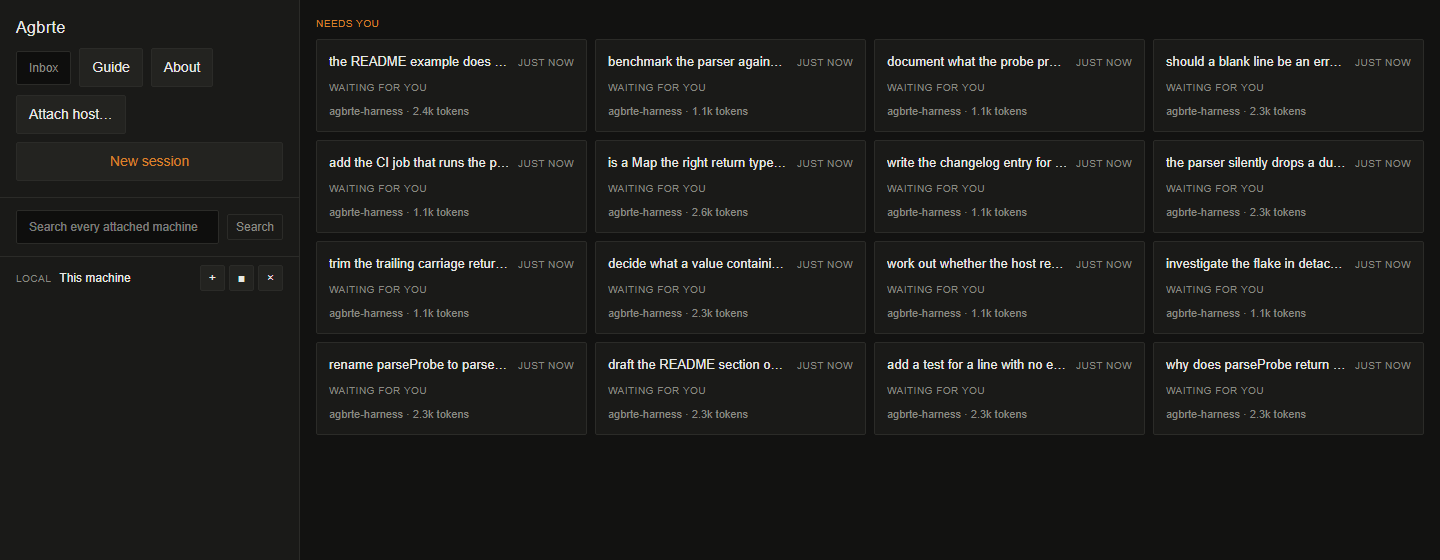
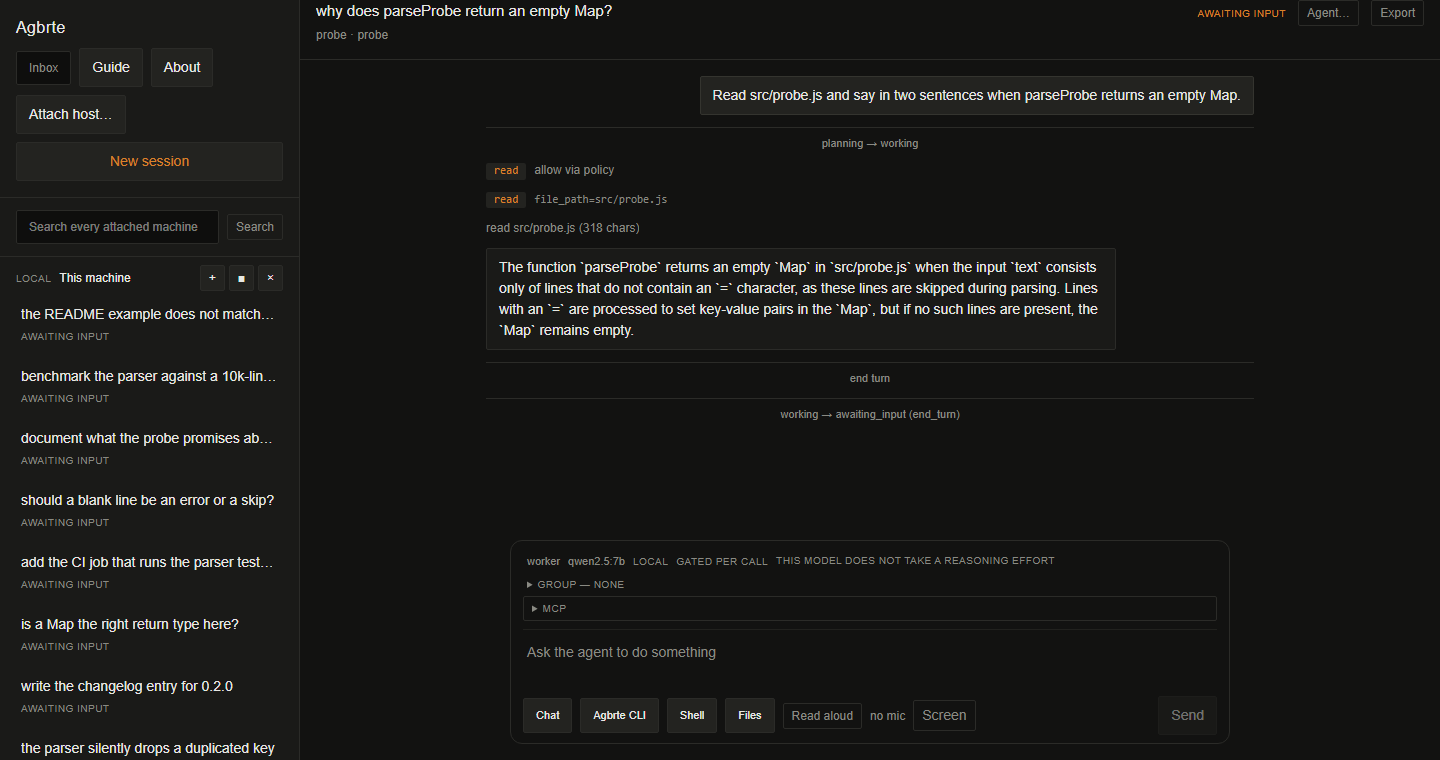
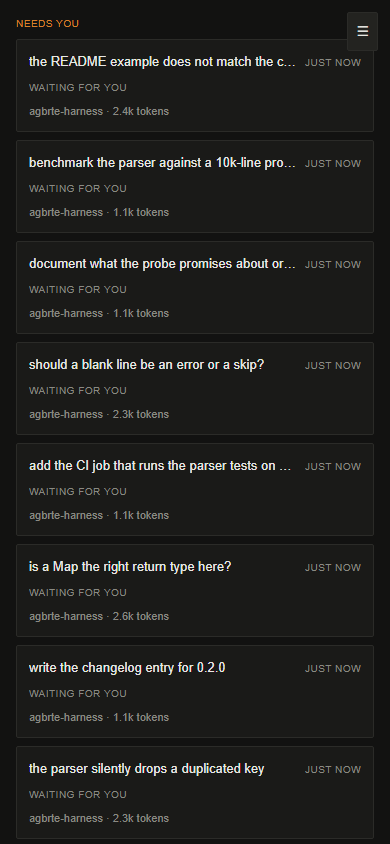
One accent colour on a neutral ground, spent only where a person has to act. On the dashboard that mark appears exactly once — on the heading of the group that needs them.
Six things that follow from the one decision
Close the laptop
Quit the app mid-turn. The host keeps working and keeps writing. Reopen and you rejoin the same session at the same pid, mid-turn if it still is.
Move to another machine
Attach from a second device and you are in the same session, not a copy of it. Both windows show the same transcript because there is one.
Watch without touching
A client asks for a role and the host decides. Read-only means read-only: enforcement is with the owner, because a client that can still send is not read-only.
Drive it from a terminal
agbrte run . "…" is scriptable and exits with a code. The same host, the same log — the GUI is not privileged.
Work on a server
Attach a workspace over ssh. The agent's file reads and shell commands happen there; only the transcript crosses the network.
Answer a prompt from a phone
Serve the interface over your own network. A permission request that appeared on your desk can be answered from the sofa — and the other client is told who answered.
What is not built, said out loud
The recurring failure in this project has a name: correct code behind a seam nobody crosses. A module that passes its own tests, is reached by nothing, and reports a capability the product does not have. Several of the rules above exist because that happened and was caught.
- macOS updates itself only when signed. Squirrel.Mac requires the incoming bundle's signature to match the running one, so an unsigned build would download an update and fail at the last step. The app says so before the download rather than after.
- Six of eight transports are refused by name, with the specific missing piece, rather than falling through to the local branch.
- A child session cannot run on another machine yet. Spawning is single-host, so the field that said otherwise was mislabelling sessions; it refuses now until the fleet can own a spawn.
- Capability declarations distinguish observed from documented. A table that mixes what was measured with what a manual claims is a table nobody can trust a row of.